
As your Attack Surface Management (ASM) partner, Aftra is committed to helping you strengthen your organization's security posture. One of the most critical steps you can take is implementing DMARC to protect your domain against email spoofing and phishing attacks.
1. Why DMARC is Mission-Critical for Your Business
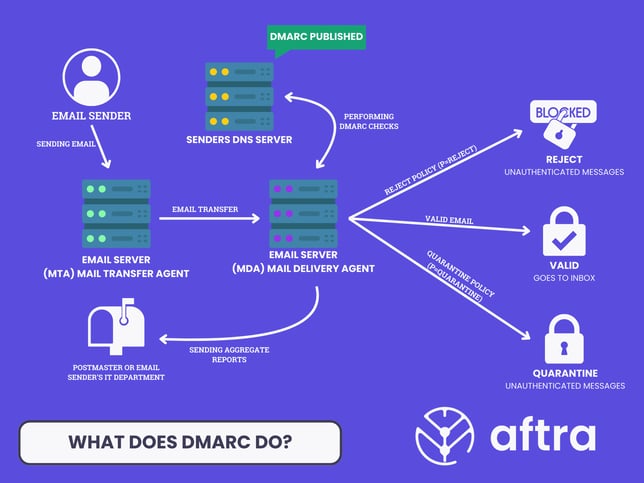
DMARC (Domain-based Message Authentication, Reporting & Conformance) protects your brand and your customers from email impersonation. With Business Email Compromise (BEC) attacks on the rise and major email providers like Google and Yahoo now requiring DMARC, it has become a business necessity.
Proper DMARC implementation helps you:
-
Prevent Phishing: Blocks unauthorized emails sent using your domain, protecting your customers and employees.
-
Protect Your Brand: Prevents brand reputation damage from fraudulent email campaigns.
-
Improve Deliverability: Signals to email providers that you are a responsible sender, which can improve inbox placement.
-
Gain Visibility: Provides reports on who is sending email from your domain, exposing unauthorized use.
2. Prerequisites for DMARC
Before you can enable DMARC, your domain must be configured for both SPF and DKIM. DMARC relies on these two protocols to function correctly.
-
SPF (Sender Policy Framework): You need a valid SPF record published in your DNS that lists all authorized services that send email on your behalf (e.g., Google Workspace, Microsoft 365, marketing platforms, etc.).
###Here's a guide on SPF Records LINK HERE-
Critical Limit: Be aware of the 10 DNS lookup limit for SPF records. Exceeding this will cause authentication to fail.
-
-
DKIM (DomainKeys Identified Mail): You must configure DKIM for your legitimate email senders. This involves publishing a public key in your DNS that corresponds to a private key used by your email services to cryptographically sign messages.
###Here's a guide on DKIM configuration LINK HERE
3. The 3-Phase Implementation Plan
A gradual rollout is the safest way to implement DMARC without disrupting legitimate email.
Phase 1: Monitor & Discover (Recommended 2-4 Weeks)
The goal is to see who is sending on your behalf without blocking any email.
-
Publish a
p=nonerecord. Create a TXT record in your DNS for_dmarc.yourdomain.com:v=DMARC1; p=none; rua=mailto:dmarc-reports@yourcompany.com;-
p=none: The monitoring policy. No enforcement action is taken. -
rua=...: This is the address where you will receive daily aggregate reports.
-
-
Analyze Reports. Use a DMARC analysis tool to process these reports. Identify all legitimate services sending for you and fix their SPF/DKIM alignment if needed.
Phase 2: Gradual Quarantine (Recommended 2-4 Weeks)
The goal is to start moving unauthorized emails to the spam folder.
-
Introduce
p=quarantinewith a small percentage. Update your record to begin enforcement on 10% of unauthenticated emails.v=DMARC1; p=quarantine; pct=10; rua=mailto:dmarc-reports@yourcompany.com; -
Increase the Percentage. As you confirm legitimate mail is unaffected, increase the percentage weekly:
pct=25,pct=50, until you reachpct=100.
Phase 3: Full Rejection
The goal is maximum protection by blocking all unauthorized email.
-
Set policy to
p=reject. Once you are confident that all your legitimate mail is authenticating correctly under a full quarantine policy, you are ready for the final step.v=DMARC1; p=reject; rua=mailto:dmarc-reports@yourcompany.com;This policy instructs mail servers to completely reject any email from your domain that fails DMARC checks.
4. Common Mistakes to Avoid
-
Exceeding the SPF 10-Lookup Limit: Use a free online tool to check your SPF record before and after adding new services.
-
Identifier Alignment Failures: Ensure your third-party services are configured to align their SPF and DKIM domains with your "From" address domain.
-
Forgetting Subdomains: Attackers often target unused or forgotten subdomains. Protect them by setting a subdomain policy (
sp=reject) in your main DMARC record.
5. Recommended Tools
To make this process easier, we recommend using dedicated tools:
-
DMARC Record Validators: MXToolbox, EasyDMARC, and dmarcian offer free tools to check your records for syntax errors.
-
DMARC Reporting Services: A reporting service is essential for analyzing the XML reports. Popular options include EasyDMARC, PowerDMARC, and dmarcian.
Implementing DMARC is a powerful step in securing your email channel. As your security partner, Aftra is here to provide the visibility and guidance you need to manage your external attack surface effectively.