
Our system has detected one of two potential issues:
-
Compromised Password: The password you use for Heimildin.is has been found in a known data breach, making it insecure and putting your account at risk.
-
Use of Work Email: Your work email is being used for a personal service, which is against company policy to ensure the security and integrity of our systems.
Please follow the relevant instructions below to resolve this issue immediately.
Part 1: Scenario: Your Password Has Been Compromised
If you were notified about a compromised password, you must change it immediately to protect your account and any subscription details. The fastest way to do this is using the "Forgot Password" feature.
Step-by-Step Guide:
-
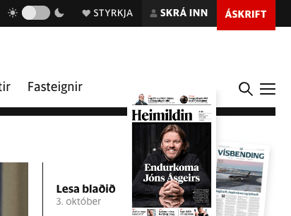
Navigate to the Login Page: Go to the Heimildin.is homepage. In the top-right corner, click on "Skrá Inn" (Login).
-
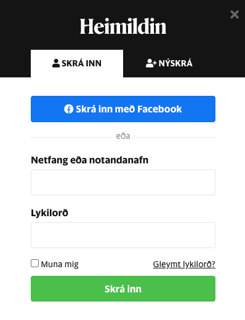
Find the "Forgot Password" Link: A login window will appear. Click the link that says "Gleymt lykilorð?" (Forgot password?).
-
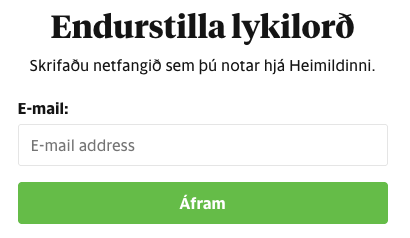
Enter Your Email Address: You will be taken to a new page. Enter the email address associated with your account and click "Endurstilla lykilorð" (Reset password).
-
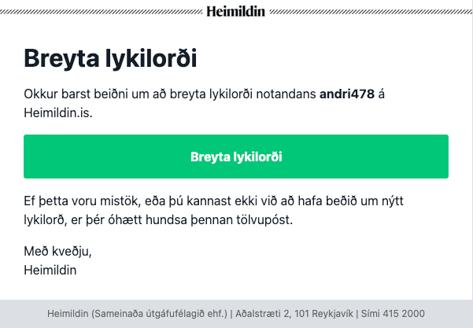
Check Your Email: Heimildin.is will send a password reset link to your inbox. If you do not see it, please check your spam or junk folder.
-
Create a New, Strong Password: Open the email and click the reset link. Create a new, strong password that is unique and not used on any other website.
After completing this, your account will be secure.
If you were also notified about using a work email, please proceed to Part 2.
Part 2: Scenario: Your Work Email is Used on the Account
Using a company email for a personal news subscription is against Aftra's security policy. You have two options to resolve this.
Option A: Change the Email on Your Account (Recommended)
This is the best option if you wish to keep your Heimildin.is account and its subscription history.
-
Log In and Go to Your Account: Log in to your Heimildin.is account. Click on
"Mín Síða" (My Account) in the top-right corner and select "Breyta netfangi" (Edit information) from the dropdown menu.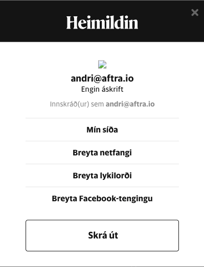
-
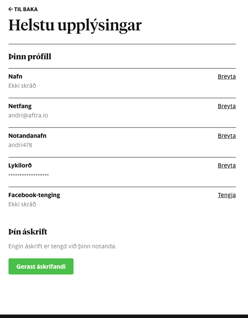
Locate the Email Field: On your profile page, find the field labeled "Netfang" (Email) and click "Breyta".
-
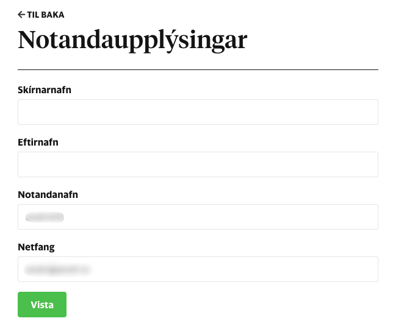
Update Your Email: Replace your work email with your new personal email address. You may need to enter your current password to confirm the change. Click the "Vista" (Save) button to finalize.
Option B: Permanently Delete Your Account
If you no longer need the account or your subscription, you can request its deletion.
Note: Heimildin.is does not offer an automated, self-service option to delete your account, as this is tied to subscription management. You must contact their customer service to request the removal of your personal data.
-
Draft an Email: Open your email client and compose a new message to Heimildin's subscription service at askrift@heimildin.is.
-
Write Your Request: Use a clear subject line, such as "Beiðni um uppsögn og eyðingu aðgangs" (Request for cancellation and account deletion). In the email, state that you wish to cancel your subscription (if active) and permanently delete your account and all associated personal data. Include the email address associated with the account for identification.
-
Send and Wait for Confirmation: Send the email. The customer service team will process your request and should reply to confirm once the account has been deleted.
Thank you for taking prompt action to secure your account and comply with your company's security policies.